Harrier
A gold basket EA with a ladder that ends.
Harrier is a trend-following expert advisor for gold (XAUUSD). It only trades with the trend, holds one small basket at a time, and closes that basket as one. The ladder has a hard end, and a daily stop on equity is on by default.
$159 · or $50 per month to rent

- Symbol
- XAUUSD, any suffix, any chart timeframe
- Account
- MetaTrader 5, hedging only
- Basket
- One at a time, at most 5 legs (7 with Soft)
- Default risk
- 0.01 lot per 5,000, daily stop 15%
One basket at a time, and a ladder that stops
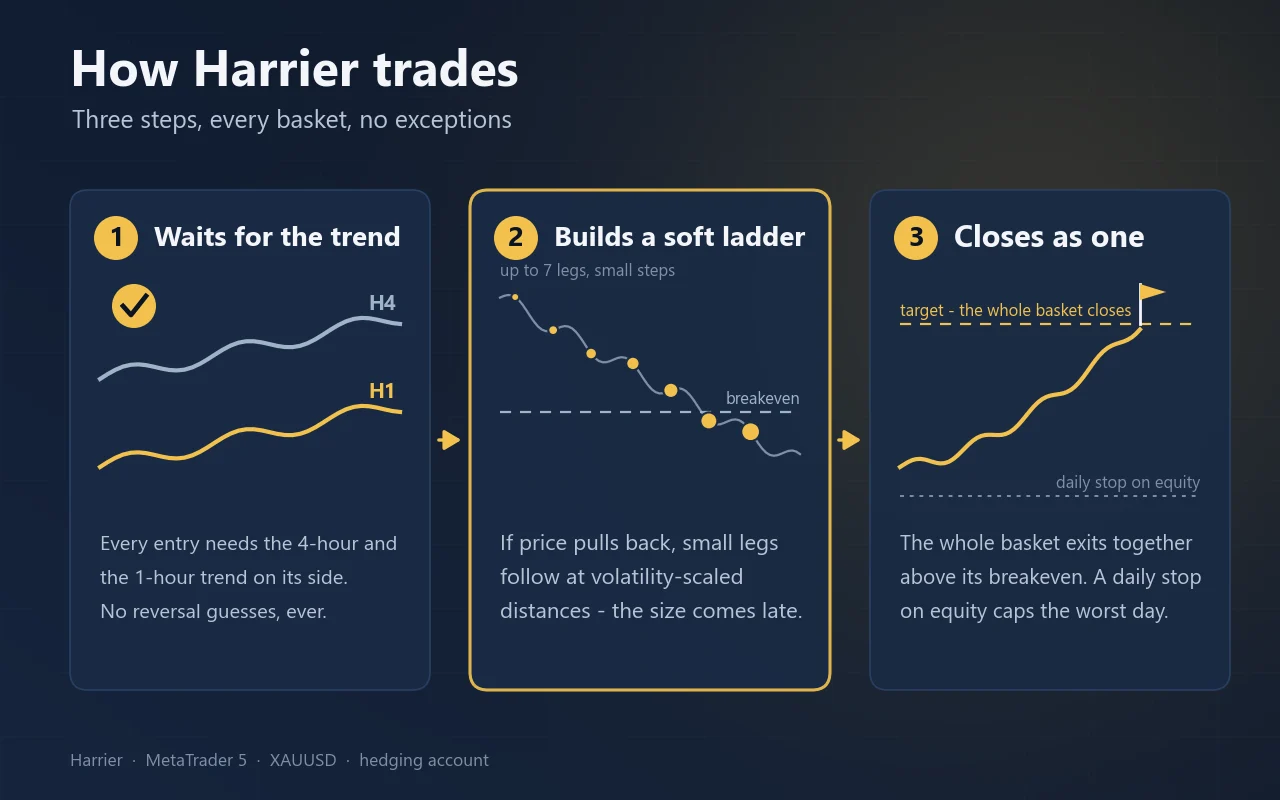
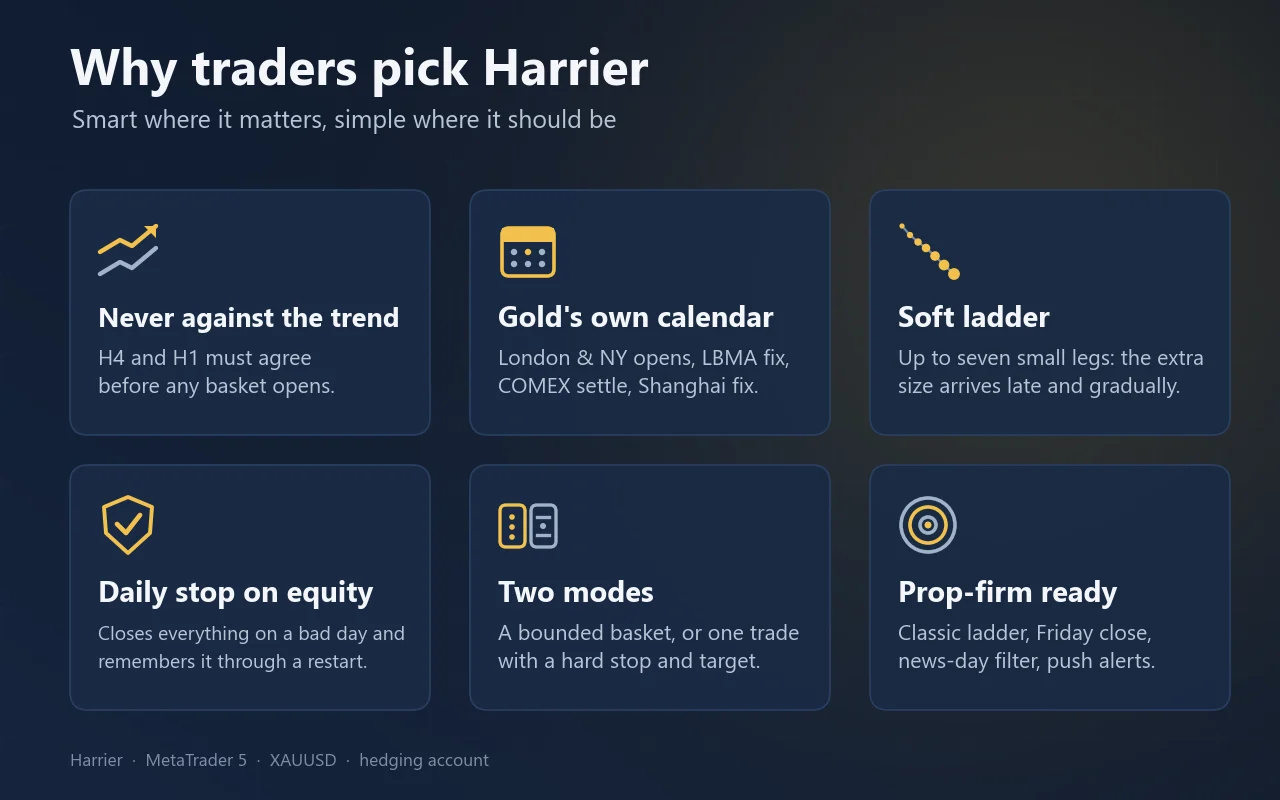
Harrier trades gold and holds one basket at a time. Every entry needs the 4-hour and the 1-hour trend on its side. There are no reversal guesses and never a buy and a sell open together.
- 1
An entry with the trend
A basket begins as a single position from one of fourteen entry models: classic trend entries and the moments that move gold, such as the London fix, the second wave of New York, Monday’s opening gap and the strong trend day. Eight are on by default.
- 2
Legs added late and gradually
If price moves against the basket, the EA adds legs at distances that scale with current volatility. The default Classic ladder allows at most five legs, the optional Soft ladder seven. The extra size comes late and in small steps. No averaging past the last leg, no re-entry into a losing basket.
- 3
The basket closes as one
There is no take profit per leg. The whole basket closes together at a fixed distance beyond its weighted breakeven. The exit does not need price to return to the first entry, only to the average of the basket, which is much closer.
- 4
A daily stop behind it
The daily stop watches equity, including the floating loss of the open basket. It turns the basket that never comes back into a known loss, without cutting the baskets that dip a little deeper and recover.
Two modes
Next to the basket mode there is an SL/TP mode: one position per signal with a hard stop and target on the order, sized from the stop distance, with no ladder at all. It exists for accounts and rules that do not allow averaging. It trades six of the fourteen entries and wins less often; its worst case is the stop.
What keeps it in check
The basket is the unit of risk. A win rate says nothing about an unfinished basket, so Harrier limits the basket, the day and the account separately.
Daily stop on equity
Closes everything and stands down for the rest of the server day once equity falls a set percentage below the day’s opening balance. Default 15%, which is 750 per 0.01 lot at the Low profile. It counts the floating loss and is remembered through a restart.
Daily limit per leg
Optional. Refuses a new leg when the day’s realised loss plus what the basket can still lose would breach your limit. It does not close anything that is already open.
Emergency stop
Optional. Closes everything at a set drawdown from the equity peak and blocks trading for 72 hours. It stays blocked until you clear it by hand.
Sits out the Fed
No new basket on an FOMC day, none from 60 minutes before to 75 minutes after an FOMC, CPI or NFP release, and none from an FOMC release until 10:00 server time the next day. An open basket exits at breakeven on an FOMC day.
Friday and weekend
No new basket on Friday from 17:00 server time. An optional Friday close shuts every basket before the weekend for accounts whose rules forbid weekend positions.
Self-checks
Refuses netting accounts and symbols other than gold, refuses to run twice on one symbol, finishes a partly closed basket, waits when the market is closed, and warns when the server clock is not GMT+2/+3.
What the test showed
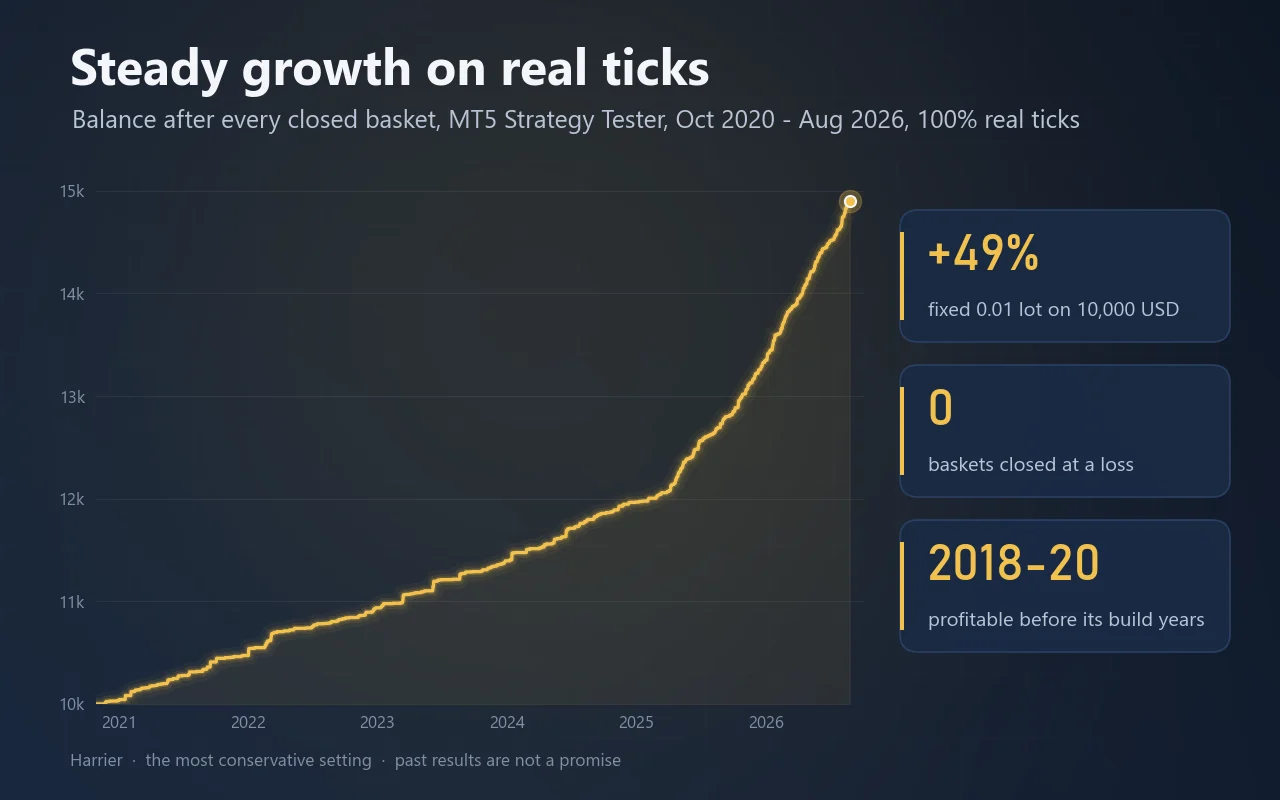
One run with every condition stated: XAUUSD on 100% real ticks from 29 October 2020 to 28 August 2026, a 10,000 USD hedging account, all inputs at their defaults except a fixed 0.01 lot for the whole period. That is more conservative than every risk profile.
- Net profit
- +4,899 USD
- +49% at a fixed 0.01 lot on 10,000
- Profit factor
- 3.52
- 2,454 deals
- Max equity drawdown
- 4.63%
- 685.10 USD
- Deepest basket
- −675
- per 0.01 lot, floating; none closed at a loss
Net result per year
USD at a fixed 0.01 lot, 100% real ticks, version 1.63
Part of a year: 2020 Nov–Dec, 2026 Jan–Aug
Live signal
Harrier runs live on a cent account at the Medium risk profile with a 30% daily stop, tracked on Myfxbook since 31 October 2026: myfxbook.com/portfolio/harrier/12287027. That is one step above the default Low profile, so its swings are larger than in a default backtest. Read-only investor access: server VTMarkets-Live 3, login 36456112, investor password Harrier2026!
Outside its development period
The entry models were built on 2021–2026. The unchanged EA on October 2018 – October 2020, including the March 2020 crash, made +1,017 at a fixed 0.01 lot on 10,000 USD, with a profit factor of 3.07, a maximum equity drawdown of 5.76% and a worst basket of −147. Those ticks were rebuilt from one-minute bars with a fixed spread of 0.15; on a period where both exist, that method reproduced the real-tick run basket for basket.
Neighbouring paths
We re-run every version with each entry 1, 2, 3 and 5 minutes late, and on twelve neighbouring settings. In 1.63 the only basket deeper than −900 on any of sixteen paths opened the morning after a Fed decision; the After FOMC rule takes it away. On those paths the deepest basket is then the −675 of the main run.
Read this next to the table
The entry models were developed on the same period, so part of this result is in-sample. A live result below it is the normal outcome. The last two years produce more than half of the profit.
MetaTrader 5 Strategy Tester, every tick based on real ticks, XAUUSD, 29 Oct 2020 – 28 Aug 2026, hedging account 10,000 USD at 1:500, spread from the tick data, fixed 0.01 lot, all other inputs at their defaults. Historical results do not guarantee future results.
As shown on the MQL5 Market
The same pictures as on the product page, made from the same test runs.
From download to first trade
About five minutes, with two conditions that are not negotiable: a hedging account and gold only.
Step 1
Install
Install from the Market tab in MetaTrader 5, or copy Harrier.ex5 into MQL5/Experts and restart the terminal.
Step 2
Open a gold chart
Any suffix, any timeframe. The EA uses its own internal clock. Check that the server time is GMT+2 in winter and GMT+3 in summer.
Step 3
Attach and choose a profile
Pick a risk profile and set the daily stop to match it (see the sizing table). Enable Algo Trading.
Step 4
Read the journal
The first lines in the Experts tab state the symbol, the base lot, the profile, and what the deepest measured basket would cost on your balance.
Step 5
Demo first, then leave it alone
Run two to four weeks on a demo account at the same broker, on a VPS or a computer that stays on from Monday to Friday. After a restart the EA adopts its own open basket and continues.
Position size
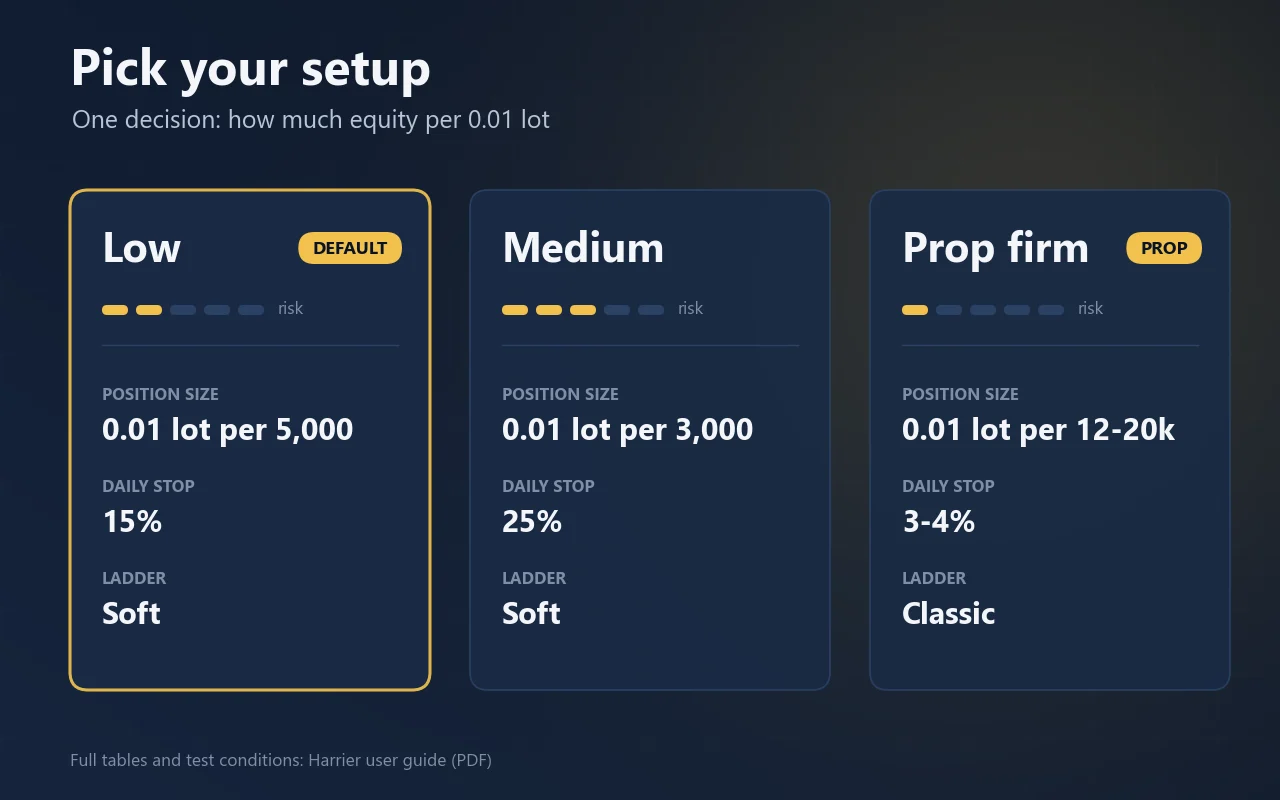
A risk profile is one decision: how much equity you keep per 0.01 lot. Size on the daily stop, not on the win rate. Per account size: the base lot, and what one basket closed by a daily stop at 750 per 0.01 lot costs.
| Account | Prop firm (0.01 per 10,000) | Low (0.01 per 5,000, default) | Medium (0.01 per 3,000) |
|---|---|---|---|
| 1,000 | 0.01 lot750 · 75.0% | 0.01 lot750 · 75.0% | 0.01 lot750 · 75.0% |
| 2,500 | 0.01 lot750 · 30.0% | 0.01 lot750 · 30.0% | 0.01 lot750 · 30.0% |
| 5,000 | 0.01 lot750 · 15.0% | 0.01 lot750 · 15.0% | 0.01 lot750 · 15.0% |
| 10,000 | 0.01 lot750 · 7.5% | 0.02 lot1,500 · 15.0% | 0.03 lot2,250 · 22.5% |
| 25,000 | 0.02 lot1,500 · 6.0% | 0.05 lot3,750 · 15.0% | 0.08 lot6,000 · 24.0% |
| 50,000 | 0.05 lot3,750 · 7.5% | 0.10 lot7,500 · 15.0% | 0.16 lot12,000 · 24.0% |
| 100,000 | 0.10 lot7,500 · 7.5% | 0.20 lot15,000 · 15.0% | 0.33 lot24,750 · 24.8% |
Daily stop to set per profile: Prop firm 7.5%, Very low 9.4%, Low 15%, Medium 25%, Medium-high 37.5%, High 75%. Below the amount of a profile the EA still trades 0.01 lot and warns once a day. Two stops can come on consecutive days, which is why we would not go beyond 0.01 lot per 2,000. On a prop firm, set the daily stop below the firm’s daily loss limit, never at it, and use the Classic ladder.
The inputs that matter
The measured engine values are built in and cannot be changed. What you set is size, risk, direction, the entries and the news rules. Change settings while the EA is flat.
General
- Mode (basket or SL/TP)
- Basket mode (default), or one trade per signal with a hard stop and target and no ladder.
- Trade direction
- Both (default), Buy only or Sell only. Affects new baskets only. Both directions carried a comparable share of the test result.
- Basket ladder
- Classic (default, up to five legs) or Soft (up to seven legs). Classic keeps the worst day smaller; Soft earns a little more in calm years and needs a wider daily stop.
- Magic number
- Keep it the same across updates: it is how the EA finds its open basket again.
Risk and position size
- Position size
- From equity (default) by risk profile, or Fixed: exactly the base lot you enter, with a warning when it is above the profile’s risk limit.
- Risk profile
- 0.01 lot per X of equity: Prop firm 10,000, Very low 8,000, Low 5,000 (default), Medium 3,000, Medium-high 2,000, High 1,000, Very high 700, or Custom with your own amount.
- Refuse a lot above the risk limit
- Off by default (warn only). Switch it on if you would rather have no basket at all on an account that is too small for the profile.
Protection
- Daily stop % of day-open balance
- Default 15%, right for Low. Set it from the sizing table for other profiles. −1 = automatic (750 per 0.01 lot), 0 = off.
- Daily limit checked before every leg
- Refuses a new leg that could breach this limit. 0 = off.
- Daily stop and limit count
- Whole account (default, as a prop firm measures) or This EA only, so another EA’s loss on the same account does not close a Harrier basket.
- Emergency stop, % drawdown from peak
- Closes everything and blocks trading for 72 hours. 0 = off.
Entries
- Entry models (TR is always on)
- On by default: TR, CT, PB, MG, DS, TD, N2, FA. Off by default: SO, NF, L2, CX, EP, SG. Enable a model because you accept its baskets: more entries mean more time in the market, not spread risk.
News
- News days without a new basket
- FOMC, FOMC + NFP (default), FOMC + Core CPI/CPI + NFP, or FOMC + Core CPI/CPI + NFP + PPI. An open basket is managed as usual.
- After FOMC
- No new basket from an FOMC release until this hour (server time) the next day. Default 10, 0 = off.
Friday and weekend
- Close all baskets on Friday
- Off by default, because closing early turns a floating loss into a realised one. Switch on if your account rules forbid weekend positions; the time is set separately (default 22:00 server).
Notifications
- Push notifications
- On by default: a message on a daily stop, an emergency stop and when a basket reaches its last leg. Needs your MetaQuotes ID in the terminal options.
Reading the panel
The panel on the chart shows what the EA is doing and why it waits. The lines it draws for the next leg, target and average price are its own guides, not orders at your broker.
- Balance / Equity / Floating
- What is realised, and what the open basket is worth now. The gap between them is your real exposure.
- Risk profile / Daily stop
- Your setting as 1:X or the fixed lot, and the daily stop in money and percent, labelled acct or EA. Red when it is too tight for your profile.
- Realised
- Closed result today, this month and in total, for this EA only.
- Open basket
- Legs and direction, current and next lot, average price, next leg price, target price.
- Worst case
- What a basket at the sizing limit of 500 per 0.01 lot would cost on your account right now.
- Baskets
- Closed baskets, win rate, drawdown now and the deepest since you started. Deposits and withdrawals do not count as drawdown.
- Entries / status
- Which models are on, the spread and volatility, and the reason when the EA is on standby.
Questions buyers ask
Click a question to open it.
How much can it lose?
Size on the daily stop. At the Low profile it closes a basket at 750 per 0.01 lot. The deepest basket of the main test floated −675 per 0.01 lot; on neighbouring paths a basket went to −1,394. A basket on your feed can be deeper than anything a test has shown.
Why does it refuse my account?
On a netting account the legs merge into one position and the basket can no longer be managed. Harrier needs a hedging account and a gold symbol.
It has not traded for hours. Is that normal?
Yes. Every entry waits for its own setup and for the trend. The status line on the panel says whether it is waiting for a signal or on standby, and why.
Can I use it on a prop-firm account?
Yes. Set the daily stop below the firm’s daily loss limit, never at it: the stop acts on the first tick after the loss is reached, and a fast market adds slippage. Use the Classic ladder, keep Daily stop and limit count on Whole account, and switch on the Friday close if weekend positions are not allowed.
Can it run next to another EA?
Yes. Set Daily stop and limit count to This EA only, so the other EA’s loss does not close a Harrier basket. The emergency stop always measures the whole account.
What happens after a restart or an update?
The EA adopts its open basket, recovers its base lot from the open legs and carries on. A daily stop of today stays in force. Save your inputs as a .set file before updating, and keep the magic number the same.
How should I backtest it myself?
Use every tick based on real ticks from your own broker and check the tick quality line in the report. Below 99% real ticks the tester invents ticks from minute bars, and invented ticks flatter every averaging system.
Good to know
It averages into losing positions
Up to five legs by default. That is a deliberate design with a measured worst case, not a safety feature. Size the account for the worst basket, never for the win rate.
Depth depends on your feed and timing
An entry a minute later, or a high a few cents different, decides whether a basket closes after two legs or goes on to seven. On neighbouring test paths the daily stop closed four baskets in six years at the Low profile, and two stops can come on consecutive days.
Part of the result is in-sample
The entry models were developed on the test period, and the last two years produce more than half of the profit. A live result below the test is the normal outcome.
Protection runs in software
Every stop is taken by the EA itself, so it only protects while the terminal is open and connected. It cannot prevent a gap, and slippage in a fast market can make a stopped day cost more than the setting.
What changed
Current version 1.65, updated 31 October 2026.
v1.6531 Oct 2026
Classic ladder (five legs) is now the default; the Soft ladder (seven legs) stays available.
v1.6310 Oct 2026
No new basket from an FOMC release until 10:00 server time the next day (After FOMC). SO, SG, CX and L2 entries off by default.
v1.628 Oct 2026
Soft ladder of up to seven legs as the default. New Basket ladder setting with Classic (five legs) for tight daily stops.
v1.617 Oct 2026
EP late-session entry off by default.
v1.605 Oct 2026
Daily stop and daily limit can count the whole account or this EA only.
v1.594 Oct 2026
Choice of news days without a new basket (FOMC, NFP, Core CPI/CPI, PPI). Shorter input labels.
v1.583 Oct 2026
Daily stop survives a restart, partly closed baskets are finished, no second copy on one symbol, server-clock warning, push notifications.
v1.573 Oct 2026
Pauses trade actions for 60 seconds when the market is closed. Trading unchanged.
Harrier
Gold · available on the MQL5 Market · questions? Message us on MQL5