Avocet
A patient AUDCAD basket system for small accounts.
Avocet trades AUDCAD on accounts from 1,500 USD. It waits until price has stretched well away from its hourly average, opens a small basket against the stretch and closes it on the way back. Every basket has a stop, and an account emergency stop sits behind everything. It trades a market that moves on its own, so it sits well next to gold expert advisors.

- Symbol
- AUDCAD (any suffix), any chart timeframe
- Minimum balance
- 1,500 USD (0.01 lot)
- Default size
- 0.01 lot per 2,000 of balance
- Account
- Hedging recommended; netting supported in a reduced mode
How Avocet trades
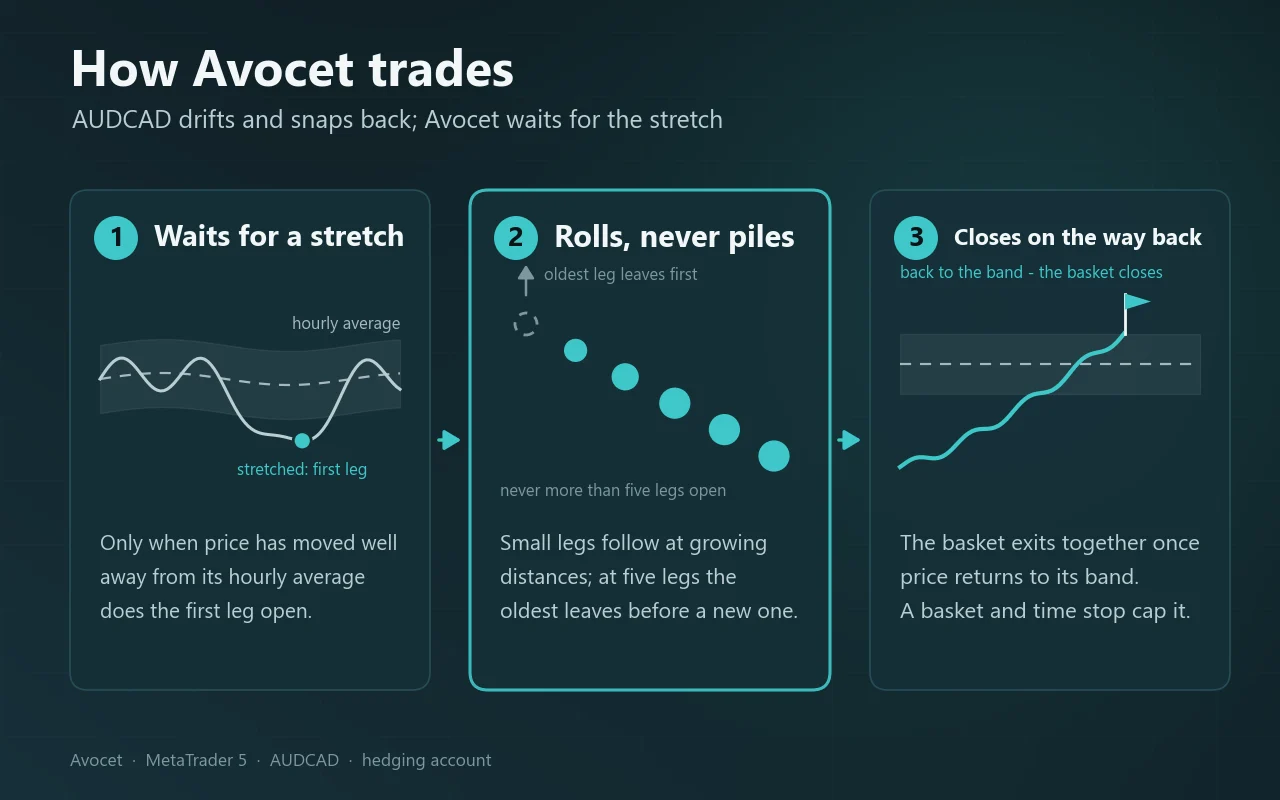
AUDCAD pairs two commodity currencies that tend to drift together and snap back after a stretched move. Avocet harvests that return to the mean with a small basket instead of a single trade.
- 1
Wait for the stretch
Avocet does nothing while price stays near its hourly average. Only when the move away from the average is large does it open the first leg, against the move.
- 2
Add at growing distances
If price keeps going, it adds legs at distances that grow with each step, so a slow trend does not fill the basket quickly. The size per leg is capped, and never more than five legs are open: when another is due, the oldest leg leaves first.
- 3
Close the basket together
A single leg closes once price is back near the average with a small profit. A basket of several legs closes as a whole, or the newest and oldest legs close together as soon as they pay for each other.
- 4
Size with the market
The starting lot follows your balance and, on larger accounts, leans slightly smaller in quiet markets and larger in lively ones, because quiet periods historically produced the deepest baskets.
Why AUDCAD
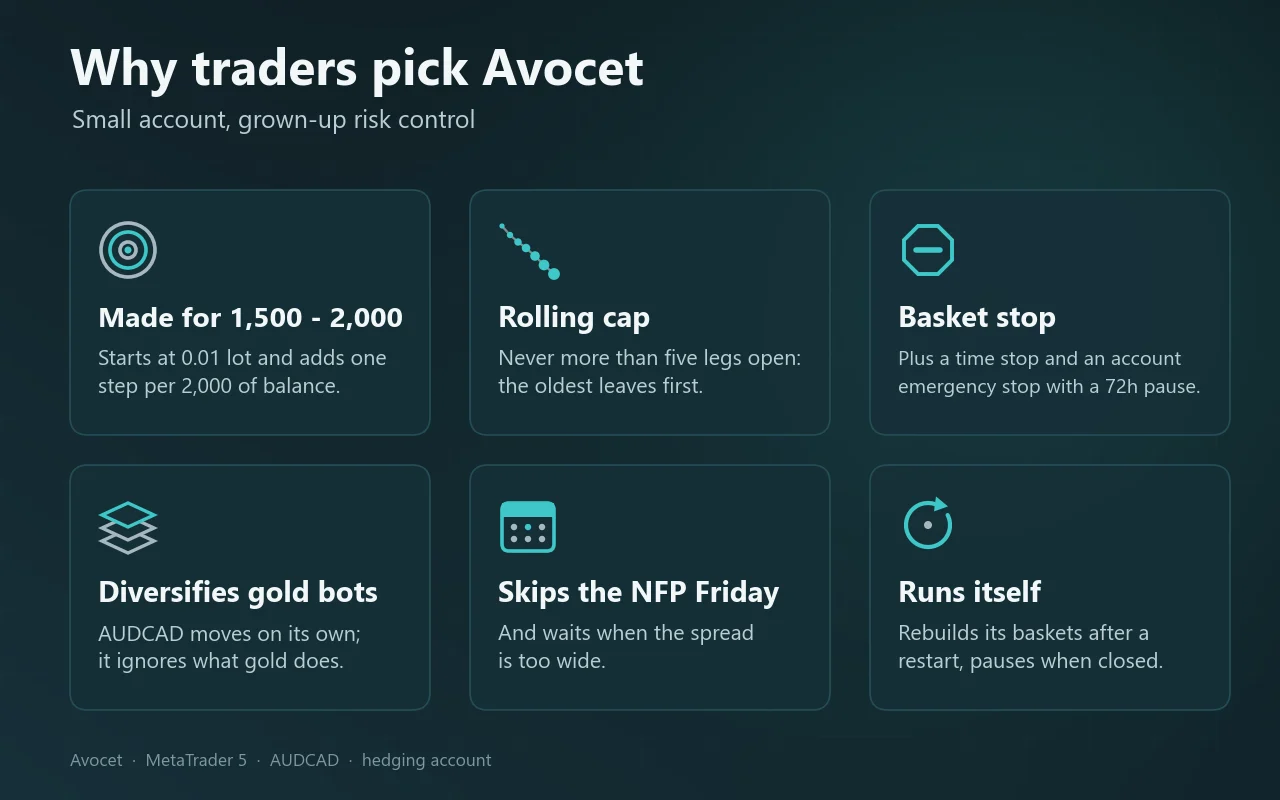
Most expert advisors on small accounts trade gold. AUDCAD moves for different reasons, and in our tests the daily results of Avocet were practically uncorrelated with our gold expert advisors Harrier and Saker. Next to a gold robot it spreads risk instead of doubling it.
What keeps it in check
Avocet is a basket system: individual legs have no stop loss of their own, and a basket can sit under water for days when AUDCAD trends against it. That is normal for this kind of system. These layers decide how far it can go.
Basket stop
Each basket closes in full when its loss, floating plus already realised, reaches a fixed limit: about $290 per 0.01 lot, roughly 14% of 2,000 or 19% of 1,500. The buy and sell baskets are separate, so in the worst case both can reach their stop.
Rolling cap and time stop
No more than five legs are open at once, and the oldest leg leaves when a new one is due. A basket that stays open for an unusually long time is closed by a time stop; the panel shows the days left.
Emergency stop
If equity falls 30% below its peak (adjustable), Avocet closes everything it holds and pauses for 72 hours. It is the last line of defence and should never be reached in normal trading.
Spread and news filters
No new leg when the spread is wider than the set maximum, and no new basket on the first Friday of the month, the day of the US jobs report.
Safe order handling
Before each order Avocet checks the broker’s volume limits and free margin. It rebuilds its baskets after a restart and stays idle while the market is closed.
Tested results
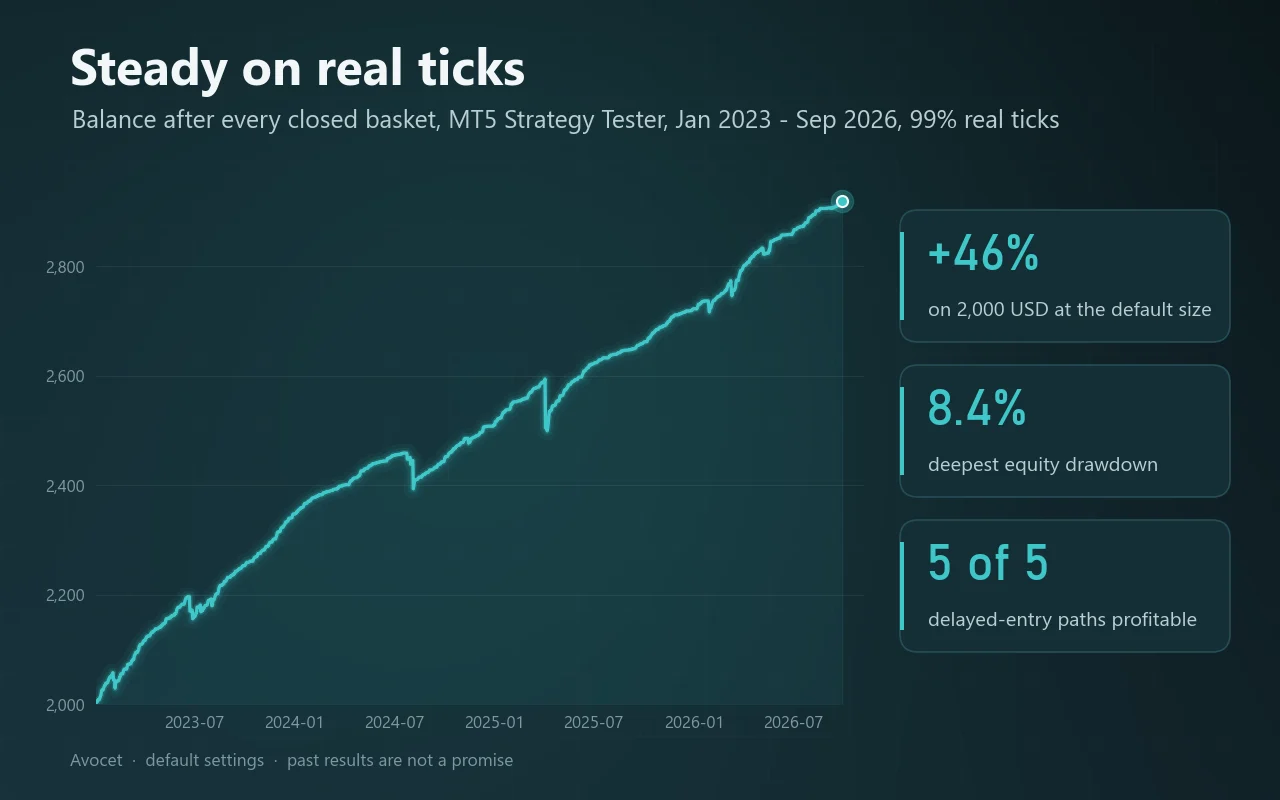
MT5 Strategy Tester, AUDCAD, 1 January 2023 – 30 September 2026, 99% real ticks, default settings (0.01 lot per 2,000). The trading of 1.06 is identical, deal for deal, to 1.04 and 1.05.
- On 2,000
- +46%
- 2,000 grew to 2,919
- Max drawdown on 2,000
- 8.4%
- deepest equity drawdown
- On 1,500
- +61%
- max drawdown 10.5%
- Basket stops
- 0
- also with entries 1–4 minutes late
Net result per year
USD per year at the default 0.01 lot per 2,000, starting balance 2,000 (the lot stays 0.01, so 1,500 shows the same dollars). MT5, 99% real ticks; 2026 through September.
Part of a year: 2026 Jan–Sep
Late-entry check
We re-ran the test with every entry 1, 2, 3 and 4 minutes late. Every one of those paths was profitable and none reached its basket stop, so the result does not hang on one lucky timing.
Why small accounts stay at 0.01
Below 4,000 of balance the lot stays at 0.01, so the volatility-based sizing only starts to matter on larger accounts. The dollar results above are therefore the same on 1,500 and 2,000; only the percentages differ.
Back-test results on one broker’s price history. Your feed, spread and swap differ, and a basket can go deeper on your account than in any test. Past results are not a promise of future results.
As shown on the MQL5 Market
The same pictures as on the product page, made from the same test runs.
From download to first trade
Avocet needs no configuration beyond choosing your position size. A quick test in the Strategy Tester with the free demo is a good first step.
Step 1
Use a suitable account
MetaTrader 5 with AUDCAD available and at least 1,500 USD. A hedging account is recommended. A VPS keeps it running around the clock.
Step 2
Open an AUDCAD chart
Any timeframe works; Avocet reads the timeframes it needs itself. On any other symbol it stays in standby.
Step 3
Attach Avocet and allow Algo Trading
Drag Avocet onto the chart, keep the defaults or set your size in group 2, and make sure Algo Trading is switched on in the terminal.
Step 4
Check the panel
The status line should read ACTIVE, with “waiting for a stretch” underneath. If it says STANDBY, the reason is shown below it.
Step 5
Leave it alone
Do not close legs by hand: the basket is managed as a whole. To run a second copy on the same account, give it a different magic number.
Position size
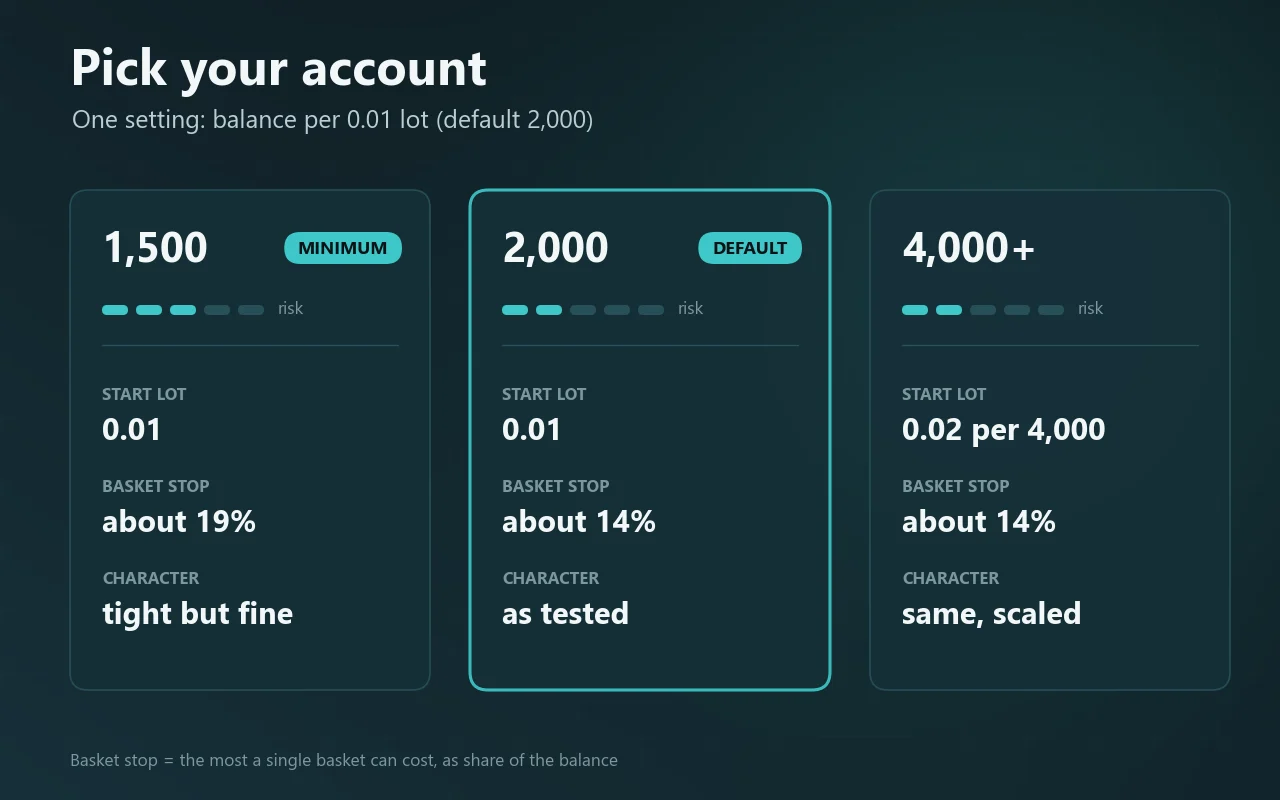
The lot is 0.01 for every full 2,000 of balance, with 0.01 as the minimum.
| Balance | Lot | Max drawdown in test | One stopped basket |
|---|---|---|---|
| 1,500 (minimum) | 0.01 | 10.5% | about 19% |
| 2,000 (default) | 0.01 | 8.4% | about 14% |
| 4,000 and more | 0.02 per 4,000 | not tested separately | about 14% |
A larger balance per 0.01 lowers both numbers proportionally. Buy and sell baskets are separate, so in the worst case two baskets can be stopped.
The inputs that matter
The trading engine is fixed and cannot be changed by accident. These are the inputs, in the five groups shown in MetaTrader.
General
- Magic number
- Default 888420. Change it only when running a second copy on the same account.
Position size
- Balance per 0.01 lot
- Default 2,000. A higher value trades smaller and lowers the drawdown; a lower value does the opposite.
- Fixed lot (0 = from balance)
- Default 0. Set a fixed starting lot if you prefer that over sizing from the balance.
Protection
- Emergency stop, % below equity peak (0 = off)
- Default 30. Closes everything Avocet holds and pauses for 72 hours. We advise keeping it on.
Filters
- Max spread for a new leg (points)
- Default 30. No new leg while the spread is wider than this.
- No new basket on the first Friday (NFP)
- Default on. Skips new baskets on the day of the US jobs report.
Other
- Max slippage (points)
- Default 100.
- Show the panel
- Default on. Turning it off does not change the trading.
Reading the panel
The panel on the chart shows what Avocet holds and why it is waiting.
- Balance / Equity / Floating
- Account balance, equity, and the floating result of Avocet’s own positions.
- Position size
- Your sizing rule and the current lot, for example “0.01 per 2000 (now 0.01)”.
- Emergency stop
- The account stop level, or “off”.
- Realised
- Closed result today, this month and in total, including swap and commission.
- BUY / SELL basket
- Number of open legs out of five, and the total lot of each basket.
- Result / basket stop
- The basket’s result against its stop in money, and the days left before the time stop. Orange when under water, red when past half the stop.
- Statistics
- Closed legs won and lost, win rate, drawdown now and the maximum, and the deepest floating result so far.
- Market
- Distance of price from its hourly average in pips, and the current spread against your maximum.
- Status
- ACTIVE (waiting for a stretch), BASKET OPEN, or STANDBY with the reason: market closed, Algo Trading off, first Friday, emergency stop, or wrong symbol.
Questions buyers ask
Click a question to open it.
Why are there no stop losses on the trades?
Avocet manages the basket as a whole. A stop per leg would close legs at exactly the moment the stretch is largest. The protection sits at basket level instead: the basket stop, the time stop and the account emergency stop.
A basket has been under water for days. Is something wrong?
Usually not. AUDCAD sometimes trends slowly against a basket for several days; the growing distances, the five-leg cap and the rolling of the oldest leg are built for that. The panel shows how far the basket is from its stop.
Can I run it on other pairs?
No. The engine is built and measured for AUDCAD only. On another symbol Avocet stays in standby. In the Strategy Tester it trades any symbol so the Market validation can run, but those results mean nothing.
Does it work on a netting account?
Yes, in a reduced mode: one position at a time and no adds. That differs from the tested results, which were made on a hedging account.
Can I run it next to Harrier or Saker?
Yes. Each uses its own magic number, and Avocet’s daily results hardly move with gold. Mind the combined risk: the emergency stop of each expert advisor looks at the whole account.
What happens after a restart or a VPS reboot?
Avocet rebuilds its open baskets from its own positions and continues where it left off.
Can I change the distances or the exits?
No. The engine values are fixed, so they cannot be broken by accident. Only size, protection, filters and display are adjustable.
Good to know
A basket can be stopped
A long AUDCAD trend can carry a basket to its stop, about 14–19% of a 1,500–2,000 account at 0.01. With both baskets open, two stops are possible.
Short real-tick history
The tested period with reliable real ticks is January 2023 to September 2026. Older markets were rougher for this kind of system, and future markets may be too.
Your feed differs
Spread, swap, commission and price feed vary between accounts. A basket can go deeper on your feed than in any test.
Leverage
Trading with leverage can cost more than you intend. Only use money you can afford to lose, and test on a demo first.
What changed
Current version 1.06, updated 8 October 2026.
v1.062026-10-08
New chart panel with open baskets, basket stop, realised result and status; inputs reduced to five clear groups. Trading unchanged.
v1.052026-10-08
Market version: AUDCAD only, reduced mode for netting accounts, volume and free-margin checks before each order, engine values fixed. Trading unchanged.
v1.042026-10-06
Starting lot follows market volatility; one entry condition removed. Better result and lower drawdown on every tested entry timing.
v1.032026-09-28
Basket stop moved beyond the deepest basket seen in testing, so it acts as an emergency brake instead of cutting recoverable baskets.
v1.022026-09-26
Extra add filter switched off by default; a long time stop added as insurance.
v1.002026-09-26
First version.
Avocet
AUDCAD · available on the MQL5 Market · questions? Message us on MQL5